The SEO Lever Nobody Talks About Enough
When bloggers think about SEO, the conversation almost always goes to backlinks — getting other sites to link to yours. And backlinks matter, eventually. But for a new blog with no domain authority and no existing relationships in your niche, obsessing over backlinks is like worrying about the roof before you’ve built the walls.
Internal linking is different. You control it completely, you can implement it from your very first post, and done correctly it creates the kind of content structure that helps both Google and your readers understand your site. It’s not a workaround or a consolation prize for not having backlinks — it’s a genuine SEO advantage that most bloggers consistently underuse.
This guide shows you exactly how to build an internal linking system that works, starting with the structure and going through to the specific habits that keep it functioning as your blog grows.
Why Internal Linking Actually Matters for Rankings
Before getting tactical, it’s worth understanding what internal links actually do — because the mechanism explains why the strategy below works.
They help Google understand your content structure. When you link from one post to another with descriptive anchor text, you’re telling Google what the linked page is about and how it relates to the page it’s being linked from. A post on “how to do keyword research” that links to “how to use Ahrefs for beginners” tells Google that these two topics are related — which contributes to the topical authority signal in your niche.
They distribute ranking strength across your site. Every page on your site has some level of ranking strength. Internal links pass a portion of that strength to the pages they point to. A high-performing post that links to a newer, struggling post gives that newer post a small but real boost — one that accumulates across many links over time.
They increase time on site and pages per session. When readers follow internal links to related content, they stay on your site longer and view more pages. Both of those are positive engagement signals that Google uses as an indicator of content quality.
They’re the primary SEO tool available to new blogs. Before you have backlinks from other sites, your internal links are the main signal telling Google how your content is organized and which posts matter most. For a new blog, this isn’t a secondary strategy — it’s the foundation.
Step 1: Stop Thinking in Individual Posts — Start Thinking in Clusters
The most important mindset shift in internal linking is moving from “I’m writing a post” to “I’m building a content network.” Individual posts in isolation don’t build topical authority. Connected posts around a central theme do.
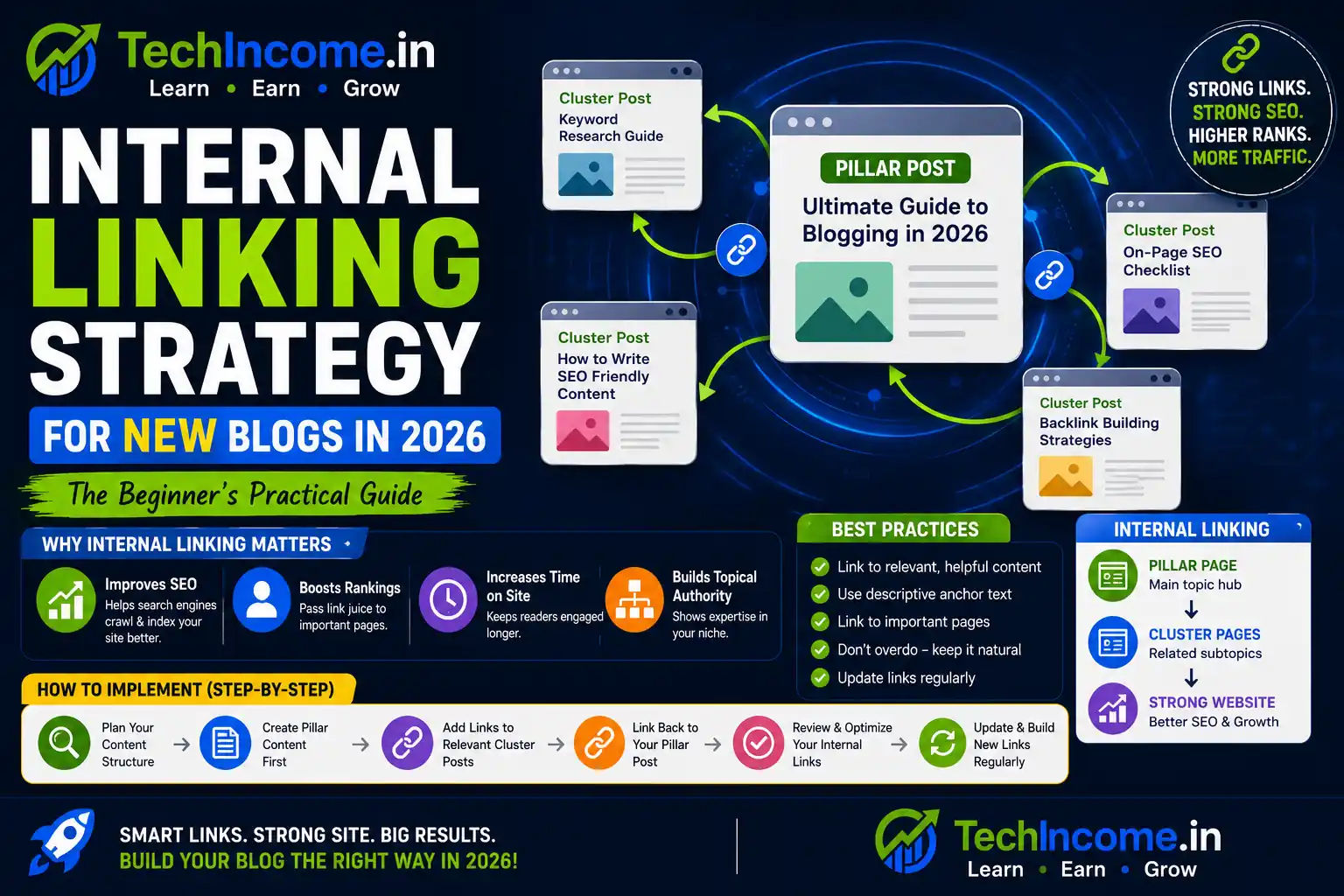
The structure that works is called a topic cluster, and it looks like this:
One pillar post — a comprehensive, broad piece on your central topic. For a blogging niche, that might be “Is Blogging a Good Side Hustle in 2026?” or “Complete Guide to Starting a Blog in India.” This post covers the topic at a high level and links outward to more specific supporting content.
Multiple supporting posts — each one goes deep on a specific subtopic within the pillar’s umbrella. Under the blogging pillar, supporting posts might be: how to choose a blogging niche, how to set up WordPress, how to do keyword research, how to write SEO content, how to get AdSense approved, how to monetize with affiliate marketing, how many posts you need to make money.
The linking between them — each supporting post links back to the pillar. The pillar links out to all supporting posts. Supporting posts that are closely related link to each other. This web of connections is what creates topical authority.
Google reads this structure and understands that your site has genuine depth on this subject — not just one post that covers it superficially, but an interconnected system of content that covers every angle. That’s what earns rankings in competitive niches.
Plan your first 30 posts as a cluster before you start writing. Identify your pillar topic, list the 25 to 28 supporting posts that connect to it, and keep that structure in mind as you publish and link.
Step 2: Add 2 to 5 Internal Links to Every Post Before Publishing
Make this a non-negotiable publishing rule: no post goes live without at least two internal links pointing to relevant existing content on your site.
This sounds simple, but it’s the step most bloggers skip — especially early on when there isn’t much to link to yet. The habit is worth building from post one, even if you only have two or three posts to link between. As your content library grows, the value of each link increases because there’s more content for Google to crawl through.
For each new post, before you hit publish:
Read through the draft and identify natural places where you mention a topic you’ve already covered in another post. That’s where the link goes — not as an afterthought bolted to the end, but woven into the content where the topic is relevant.
Aim for 2 to 5 links per post for most content. In a very long post (2,500+ words), up to 7 or 8 contextual links is reasonable. In a shorter post, 2 to 3 is enough. More than that starts to feel forced and can actually dilute the value of each individual link.
Step 3: Use Descriptive Anchor Text — Every Single Time
Anchor text is the clickable words that carry a hyperlink. It’s also one of the most direct signals you send to Google about what the linked page is about — and most bloggers consistently waste this signal with vague, meaningless phrases.
Weak anchor text:
- “Click here”
- “Read more”
- “This post”
- “Learn more”
These tell Google nothing about the destination page. They’re lost opportunities to reinforce the topic of the linked content.
Strong anchor text:
- “how to do keyword research with Ahrefs”
- “best blogging niches for beginners in India”
- “on-page SEO checklist for new blogs”
- “how to get approved for Google AdSense”
These tell Google exactly what the linked page is about, using language that matches how people actually search for that topic. The anchor text effectively reinforces the target keyword of the destination page.
A few guidelines to keep the anchor text natural:
Don’t use the exact same anchor text to link to the same page from multiple posts — vary the phrasing slightly while keeping the meaning consistent. Google treats identical anchor text repeated across many links as potentially manipulative. Natural variation looks like: “keyword research with Ahrefs,” “how to find keywords using Ahrefs,” “Ahrefs keyword research for beginners” — all pointing to the same post, all reinforcing the same topic, none identical.
And don’t force the anchor text into an awkward sentence just to include the exact keyword phrase. If it doesn’t read naturally, rewrite the sentence so it does. The goal is contextual relevance, not robotic precision.
Step 4: Link to Your Most Important Pages More Frequently
Not all pages are equal on your site. Your pillar posts, your most comprehensive guides, and your monetization-focused pages (affiliate reviews, product pages, AdSense-heavy posts) benefit most from internal link traffic — both the SEO strength that links pass and the actual reader clicks.
Make a habit of asking, when writing any new post: does this content naturally connect to one of my pillar posts or high-priority pages? If yes, find a way to include that link contextually.
This doesn’t mean forcing links to your most important pages into every post regardless of relevance. It means being aware of which pages deserve the most link equity and prioritizing them when a natural opportunity exists.
A good way to track this: keep a simple list of your 5 to 10 most important posts (your pillar content, your best affiliate posts, your highest-traffic pages). Every time you publish something new, check whether any of those important pages are natural link destinations from the new content. More often than not, at least one will be.
Step 5: Link Contextually — The Placement Matters as Much as the Link
A link buried in a final paragraph “further reading” section is worth far less than a link placed within the natural flow of your content at the point where it’s most relevant.
Contextual linking means the link appears in a sentence where the linked topic is genuinely being discussed — not as an afterthought or a list of “you might also like” suggestions at the bottom of a post.
Good contextual link: “Before you start writing, the most important step is finding the right keyword to target. If you haven’t done this yet, this breakdown of keyword research with Ahrefs will walk you through the process step by step.”
That link appears at the moment when the reader’s need for keyword research information is highest. It’s relevant to exactly where they are in the reading. They’re likely to click it.
Poor placement: [End of article] You might also like: How to Do Keyword Research With Ahrefs
Same link, but now it’s competing for attention with five other “you might also like” suggestions at a point when the reader has already finished the article and is ready to leave. Click-through rate drops significantly.
Contextual links within the body of your content — placed where they’re most relevant to what the reader is currently reading — perform better on every metric: click-through rate, time on site, and the topical authority signal they send to Google.
Step 6: Build Using the Hub-and-Spoke Model
The hub-and-spoke model is the most effective internal linking structure for new blogs because it maps directly to how Google evaluates topical authority. Here’s what it looks like in practice:
The hub is your pillar post — the most comprehensive piece on your central topic. It should link out to all of its spoke posts.
The spokes are your supporting posts — each covering a specific subtopic in depth. Each spoke links back to the hub, and related spokes link to each other.
Linking flows in three directions:
- Spokes → Hub (every supporting post links to the pillar)
- Hub → Spokes (the pillar links out to all supporting posts)
- Spokes ↔ Spokes (related supporting posts link to each other where relevant)
Here’s what this looks like for a blogging niche:
Hub: Complete Guide to Starting a Blog in India in 2026
Spokes (each links back to the hub and to closely related spokes):
- How to choose a blogging niche
- Best WordPress setup for beginners
- How to do keyword research with Ahrefs
- On-page SEO checklist for beginners
- How to write blog posts that rank
- How to get AdSense approval
- Affiliate marketing for bloggers
- How to get traffic without backlinks
- How many posts do you need to make money
Now imagine reading the affiliate marketing post — it naturally links to the AdSense approval post (both about monetization), to the keyword research post (essential context), and back to the hub. The keyword research post links to the on-page SEO post, to the blog structure post, and back to the hub. Everything is connected.
Google crawling this structure sees a site with comprehensive, interconnected coverage of a topic — which is the signal that earns topical authority and ranking strength.
Step 7: Update Old Posts With New Links — This Is Ongoing Work
Internal linking isn’t something you do once and forget. It’s a habit that runs in parallel with your publishing schedule.
Every time you publish a new post, two things need to happen:
- The new post links to 2 to 5 relevant existing posts (covered in Step 2)
- You go back to 2 to 3 existing posts that are relevant to the new one and add a link to the new post from within their body content
That second step is what most bloggers skip, and it’s the one that keeps new content from being isolated. Without it, your new posts get internal links going out but none coming in — which means less of the site’s authority flows toward them, and Google has fewer paths to discover them through internal navigation.
Set aside 15 to 20 minutes after publishing each new post specifically for this: find 2 to 3 older posts where your new post’s topic is naturally relevant, and add a contextual link with descriptive anchor text. This small habit, done consistently, creates the dense internal link network that builds real topical authority over time.
Every month, it’s also worth doing a broader internal link audit — reviewing your newest 10 posts and checking whether they’re well-connected to each other and to your pillar content. Gaps in the network are easy to spot and quick to fix.
Step 8: Don’t Overdo It — Quality Over Quantity
There’s a ceiling on how many internal links a single page should have. Beyond a certain point, adding more links doesn’t add more value — it dilutes the signal of each individual link and makes your content harder to read.
A good working guideline: 2 to 5 internal links per 1,000 words of content. In a 1,500-word post, that’s 3 to 8 links total. In a 2,500-word post, up to 12 to 13 links is reasonable.
Beyond that, you’re likely linking for the sake of linking rather than because each link genuinely serves the reader. Over-linking also visually clutters the content — too many blue underlined phrases in a paragraph makes it harder to read and dilutes the visual hierarchy that guides readers through the page.
The quality filter for every internal link you add: does this link help the reader right now? Does it go somewhere genuinely useful given what they’re currently reading? If yes, include it. If you’re adding it primarily to tick a box, leave it out.
Step 9: Use Internal Linking to Guide the Reader’s Journey
SEO is one reason to internal link strategically. Reader experience is another — and in many ways it’s the more important one, because readers who follow internal links and stay on your site longer generate the engagement signals that reinforce your SEO in the long run.
Think about the natural journey a reader takes through your content. Someone who lands on your pillar post about starting a blog is probably a complete beginner. After reading the overview, where do they need to go next? Probably to either the “how to choose a niche” post or the “WordPress setup” post — whichever is the next practical step in their journey.
Internal links placed with this reader journey in mind will always outperform links placed purely for SEO reasons. When a link appears exactly when the reader is thinking “OK, what do I do next?” it gets clicked. When it appears randomly in a paragraph it doesn’t connect to, it gets skimmed over.
A useful exercise: for each of your posts, write down the answer to “what should the reader do or read after finishing this?” The answer should determine your primary internal link — the one that appears most prominently, most contextually, most naturally in your content.
Step 10: Combine Internal Linking With On-Page SEO
Internal linking works best as part of a broader optimization approach — not in isolation. Use Rank Math to handle the on-page SEO fundamentals (keyword placement, meta description, heading structure, schema), and layer your internal linking strategy on top of that.
The combination is what produces the strongest results. A post that’s well-optimized for its target keyword and well-connected to related content through internal links gives Google a complete picture: this page is specifically about this topic (on-page SEO) and this site has genuine depth and expertise on the broader subject area (internal linking structure).
One practical note: Rank Math’s free version includes a basic internal linking suggestion feature that can prompt you toward relevant posts to link to. It’s a useful nudge, but don’t let it replace intentional linking decisions. The suggestions are algorithmic — you still need to make judgment calls about whether each suggested link is genuinely contextually relevant or just topically adjacent.
The Internal Linking Habit — What It Looks Like Day to Day
Rather than treating internal linking as a separate project, the goal is to fold it into your existing workflow so it happens automatically with every post.
Before you write: Review your content list and pillar structure. Remind yourself which posts this new article should link to and which posts might naturally link back to it.
During the draft: When you reference a topic you’ve already covered in another post, note it (a simple highlight or bracket in your draft is enough). Don’t add links during the draft — it interrupts the writing flow.
During editing: Go through your noted references and add the actual links with descriptive anchor text.
Before publishing: Count your internal links. Do you have at least 2? Are they all contextual and relevant? Is at least one pointing to your pillar content?
After publishing: Spend 10 to 15 minutes identifying 2 to 3 older posts that should link to the new one. Add those links with fresh anchor text.
That full cycle takes 20 to 30 minutes on top of your normal writing and editing time. Across a year of publishing, those 20 to 30 minutes per post create a densely connected content network that no amount of later retrofitting can easily replicate.
Common Internal Linking Mistakes That Undermine Your SEO
No internal links at all. Every published post that has zero internal links going in or out is an isolated island — valuable to readers who find it directly but invisible to the broader site structure and unable to contribute to or benefit from topical authority.
Linking only in one direction. A new post that links to old posts but never receives links from old posts is still partially isolated. The network needs to flow in both directions.
Generic anchor text throughout. “Read this,” “click here,” “learn more” — these are wasted opportunities to reinforce keyword relevance and signal page topic to Google.
Linking to irrelevant content. Forcing a link into a post because you want to pass authority to that page, even though the connection isn’t genuinely relevant, harms reader experience and can actually confuse Google’s understanding of your content relationships.
Front-loading all links in the first few posts. As your site grows, the internal linking should grow proportionally — each new post should add both new outgoing links and trigger updates to existing posts. A blog where the first 10 posts are well-connected but posts 20 to 30 are all isolated doesn’t have a link structure — it has a partially built one.
Your Internal Linking Checklist for Every Post
Before publishing, verify:
- At least 2 to 5 internal links are included
- All anchor text is descriptive and relevant (no “click here” or “read more”)
- At least one link points to your pillar content or a closely related high-priority post
- All links are contextually placed — within the natural flow of the content, not forced in
- After publishing: 2 to 3 older posts updated with links to the new one
FAQs
-
How many internal links should I add to each blog post?
A practical guideline is 2 to 5 internal links per 1,000 words. For a typical 1,500-word post, aim for 3 to 7 contextual links. Quality and relevance matter more than hitting a specific number — every link should serve the reader and connect to genuinely related content, not just pad out a count.
-
Does internal linking actually help with Google rankings?
Yes, in several ways. Internal links help Google crawl and index your content more efficiently, pass ranking strength between related pages, signal topical authority when content is well-connected around a theme, and improve engagement metrics (time on site, pages per session) that Google uses as indirect quality signals. For new blogs without backlinks, it’s one of the highest-leverage SEO actions available.
-
What’s the difference between a pillar post and a supporting post?
A pillar post is a comprehensive overview of a broad topic — it covers the subject at a high level and links outward to more specific content. Supporting posts go deep on individual subtopics within that broader theme. The pillar might be “Complete Guide to Blogging for Beginners” and the supporting posts cover each specific aspect (keyword research, WordPress setup, monetization, etc.) in detail. Each supporting post links back to the pillar and to related supporting posts.
-
Should I go back and update all my old posts with internal links?
Yes, but prioritize strategically. Start with your highest-traffic and highest-ranking posts — updating these with links to newer, related content maximizes the authority transfer to posts that need it. Then work backward through your archive systematically, adding links to new content wherever relevant. It’s easier to build this habit from the start than to retrofit it across hundreds of posts later.
-
Can I have too many internal links on one page?
Yes. Beyond roughly 10 to 15 internal links on a typical blog post, you start diluting the value of each link and making the content visually overwhelming. There’s also a practical ceiling — the more links on a page, the less authority each individual link passes to its destination. Keep linking intentional and quality-focused rather than comprehensive.
-
Does the position of an internal link on a page matter?
Yes. Links placed early in the content and within the natural flow of the body text are weighted more heavily than links in footers, sidebars, or “related posts” widgets at the bottom of a page. This is why contextual linking — placing links within the body content where they’re most relevant — consistently outperforms navigation-based or widget-based internal linking for both SEO value and click-through rate.
-
Should I use the same anchor text every time I link to the same post?
No — vary the anchor text across different posts that link to the same destination. Using identical anchor text repeatedly to the same page can look manipulative to Google. Natural variation — different phrases that all accurately describe the linked page’s topic — looks organic and provides richer topical signals. For example, linking to your keyword research post with “keyword research with Ahrefs” from one post and “how to find low-competition keywords” from another is better than using the exact same phrase every time.