
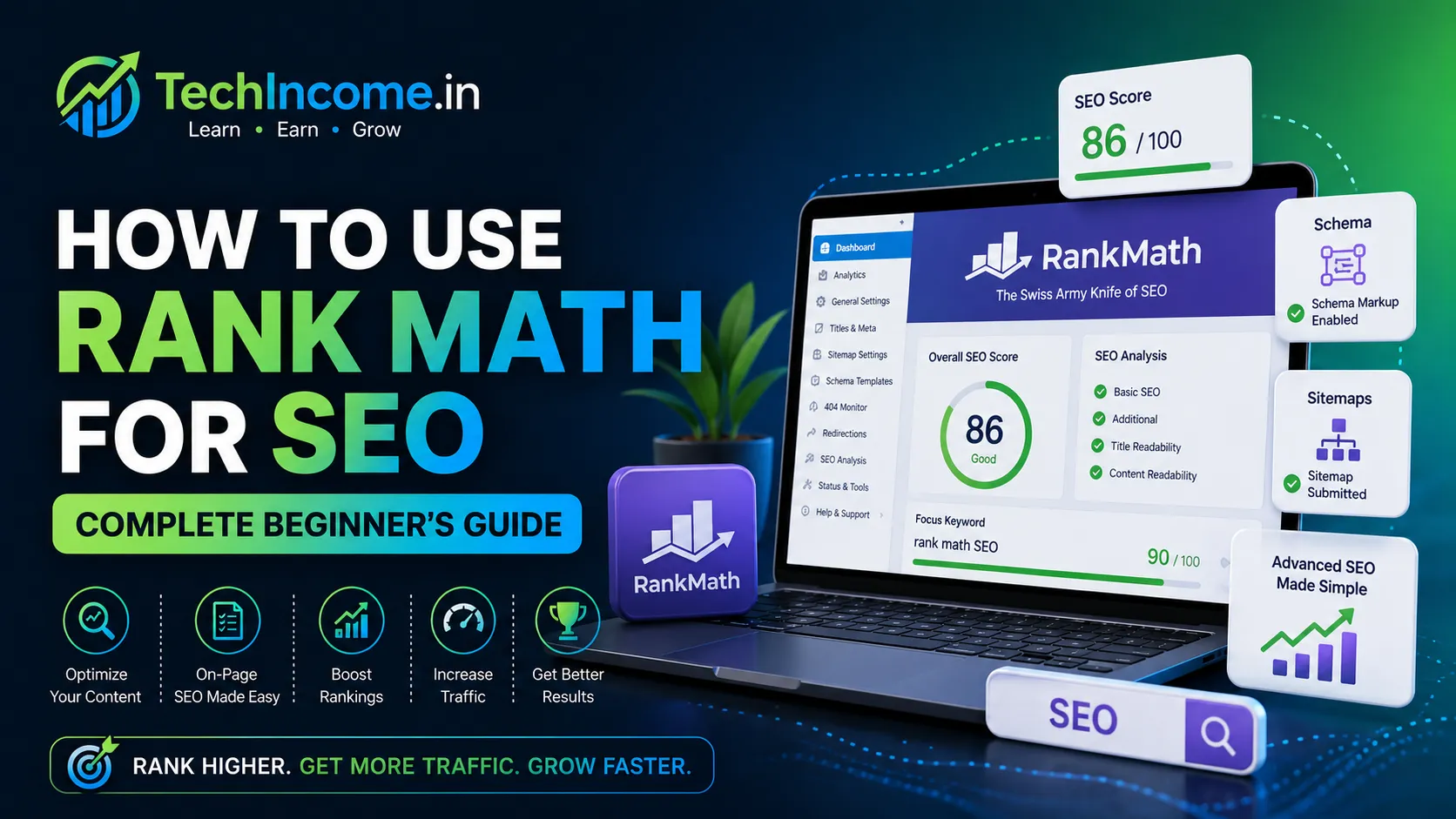
Rank Math is one of the most effective SEO plugins for WordPress. It simplifies on-page SEO, but results depend on how you use it—not just installing it.
This guide covers the exact setup and usage that works in 2026.
Don’t worry it is not overwhelming and complex, it is rather simpler.
You can use Rank Math for following things
Use Rank Math to:
- Optimize titles and meta descriptions
- Structure content properly
- Add schema
- Manage sitemaps
- Improve on-page SEO
- Instant Indexing
- FAQs
- Table of Content
Do not rely on its score alone, focus on real content quality.
What I personally believe Rank Math it is good for is its schema, sitemaps and properly structured content. The Instant Indexing feature is very effective. The Bing Search Engine almost considers the page indexing instantly. Same goes for google but for google the indexing might consider some other factors too.
Step 1: Install and Activate Rank Math
From WordPress dashboard:
- Go to Plugins → Add New
- Search “Rank Math”
- Install and activate
Step 2: Run Setup Wizard (Rank Math Setup Explained Practically)
When you install Rank Math, it launches a setup wizard. This step is important because it defines how your site communicates with search engines from the beginning.
Do not skip it, but also do not overcomplicate it.
Choose Setup Mode
You will see options like:
- Easy
- Advanced
- Custom
What to select:
- Beginners → Easy mode
- You can switch to Advanced later
This avoids unnecessary confusion.
Website Type (Very Important)
Select:
- Blog
Why this matters:
- Rank Math configures schema and SEO defaults based on this
- Helps search engines understand your site structure
Business / Website Info
You’ll be asked for:
- Website name
- Logo
- Default social share image
Practical tip:
- Upload a clean logo (even a simple text logo is fine)
- Set a default image to avoid broken previews when sharing links
Connect Google Account (Optional but Recommended)
You can connect your Google account to integrate with:
- Google Search Console
Why connect:
- View search data directly inside WordPress
- Track indexing status
- Monitor keywords
If unsure:
- You can skip now and connect later
Sitemap Settings (Enable This)
Make sure:
- XML Sitemap → Enabled
Why it matters:
- Helps Google discover your pages faster
- Essential for new blogs
Practical check:
After setup, your sitemap will be available at:
- yourdomain.com/sitemap_index.xml
Submit this in Search Console later.
Schema Setup (Default for website)
Schema helps search engines understand your content.
For beginners:
- Use Default Schema → Article
Why:
- Suitable for blog posts
- No need to configure complex schema types initially
Avoid:
- Over-customizing schema at this stage
This schema guide is the overall default schema setting, later in this article I have explained the setup of Post level schema, both are different.
SEO Tweaks (Basic Settings)
You may see options like:
- Noindex empty category/tag archives
- Nofollow external links
Recommended:
- Enable basic defaults
- Do not change advanced settings unless you understand them
Analytics Setup (Optional)
Rank Math may ask to enable analytics.
Recommendation:
- Skip for now if unsure
- You can manually connect analytics later
Final Step: Save Configuration
Once completed:
- Click Save and Continue
- Finish setup
What to Do After Setup (Important)
After wizard completion:
- Go to Rank Math Dashboard
- Ensure:
- Sitemap is active
- SEO settings are enabled
- Submit sitemap to:
- Google Search Console
Common Beginner Mistakes
- Choosing advanced settings without understanding
- Disabling sitemap
- Skipping setup wizard completely
- Over-configuring schema
Practical Summary
For beginners, your setup should be:
- Website Type → Blog
- Sitemap → Enabled
- Schema → Article
- Google connection → Optional but useful
Keep everything simple. You can optimize further as your blog grows.
The setup wizard is about getting the basics right, not perfect configuration.
Step 3: Configure Basic SEO Settings
Go to Rank Math → General Settings
Important Configurations:
- Enable XML Sitemap
- Enable breadcrumbs (optional)
- Set homepage meta title
These help search engines understand your site.
Step 4: Optimize Each Blog Post (Practical Rank Math Workflow)
When you write a post in Rank Math, you’ll see a score and checklist. Treat this as a guide, not a goal. Focus on optimizing key elements correctly rather than chasing a perfect score.
Below is how to actually use it in a real workflow.
1) Focus Keyword (Start Here)
This tells Rank Math what your post is about.
How to choose:
- Pick one primary keyword
- It should match the exact topic of your article
- Prefer long-tail keywords
Example:
- “how to start a blog in 2026”
Practical tips:
- Do not add multiple unrelated keywords
- You can include variations naturally in content, but keep one main focus
2) Title Optimization (CTR + SEO)
Your title affects both ranking and clicks.
How to write:
- Include the keyword naturally
- Keep it clear and benefit-driven
Example:
- Weak: Blogging Guide
- Strong: How to Start a Blog in 2026 (Step-by-Step Guide)
Practical tips:
- Keep length around 50–60 characters
- Avoid stuffing the same keyword repeatedly
- Add numbers, year, or outcome when relevant
3) Meta Description (Click Optimization)
This appears in search results and influences clicks.
How to write:
- Write manually (do not auto-generate)
- 140–160 characters
- Summarize what the user will get
Example:
Learn how to start a blog in 2026 with this step-by-step guide. Perfect for beginners looking to build and grow a blog.
Practical tips:
- Include keyword once (naturally)
- Focus on clarity and benefit, not keywords
4) URL (Slug) Optimization
Short URLs perform better.
How to set:
- Remove unnecessary words
- Keep it clean and readable
Example:
- Good:
/start-blog-2026 - Avoid:
/how-to-start-a-blog-in-the-year-2026-complete-guide
Practical tips:
- Use hyphens (-)
- Do not change URL after publishing (affects SEO)
5) Keyword Placement (Natural, Not Forced)
Place your keyword in key areas—but keep it natural.
Required placements:
- Title
- First paragraph (within first 100 words)
- At least one heading (H2 or H3)
Example:
If keyword = “how to start a blog in 2026”
- Title → included
- Intro → mentioned naturally
- Heading → “Steps to Start a Blog in 2026”
What to Avoid
- Repeating keyword unnaturally
- Adding keyword in every paragraph
- Writing awkward sentences just to include keywords
What Rank Math Score Really Means
- 70–85 → good enough
- 80+ → well optimized
But:
- Score ≠ ranking guarantee
- Content quality matters more
Practical Workflow (Use This Every Time)
- Write full article first
- Add focus keyword in Rank Math
- Optimize title
- Write meta description
- Adjust URL
- Check keyword placement
- Add internal links
- Review readability
- Publish
Pro Tip:
Write for the reader first, then optimize for SEO.
If your content is clear and useful, Rank Math becomes a support tool—not a constraint.
Optimization is about clarity and structure, not keyword repetition.
Step 5: Content Optimization (What Actually Improves Rankings)
At this stage, Rank Math starts analyzing your content and giving suggestions. Many beginners try to follow every suggestion blindly. That is not the goal.
The goal is to improve readability, structure, and usefulness, not just increase the score.
What You Should Actually Focus On
1) Proper Headings (H2, H3 Structure)
Headings help both:
- Readers scan content
- Search engines understand structure
Practical approach:
- Use H2 for main sections
- Use H3 for sub-points
Example:
- H2 → “How to Start a Blog”
- H3 → “Choose a Niche”
- H3 → “Buy Domain and Hosting”
Tips:
- Do not use headings randomly
- Each heading should represent a clear section
2) Paragraph Readability
Most users scan, not read fully.
Improve readability:
- Keep paragraphs 2–4 lines max
- Use simple language
- Break long text into smaller chunks
Avoid:
- Large blocks of text
- Complex sentences
3) Content Length (Depth Matters)
Rank Math may suggest word count, but length alone does not rank content.
Practical guideline:
- 1000–2000+ words for most topics
- Enough to fully answer the query
Important:
- Do not add length just to increase word count
- Add useful information, not filler
4) Internal Linking (Very Important)
This is one of the most powerful optimizations.
What to do:
- Add 2–5 internal links per post
- Link to:
- Related posts
- Pillar content
Example:
- “How to start a blog”
- “Best blogging niches in 2026”
Why it matters:
- Improves SEO
- Increases time on site
- Builds topic authority
I have covered Internal linking in depth below
What Rank Math Suggests (But You Should Use Carefully)
You may see suggestions like:
- Add keyword more times
- Increase keyword density
- Add keyword in more headings
Use judgment:
If it makes your content:
- Sound unnatural
- Reduce clarity
→ Ignore it
Real Optimization Mindset
Instead of asking:
“How do I get 100 score?”
Ask:
“Does this post fully solve the user’s problem?”
That is what actually ranks content.
Quick Optimization Checklist
Before publishing:
- Clear heading structure (H2, H3)
- Short, readable paragraphs
- Sufficient content depth
- 2–5 internal links added
- No forced keyword usage
Common Mistakes
- Writing for Rank Math instead of users
- Adding unnecessary content for word count
- Ignoring readability
- Not using internal links
Practical Workflow
- Write full content
- Improve structure (headings)
- Break paragraphs
- Add internal links
- Review clarity
- Check Rank Math suggestions
- Apply only useful ones
Content optimization is about making your article easier to read and more useful, not just more “optimized.”
Step 6: Internal Linking (Practical Implementation)
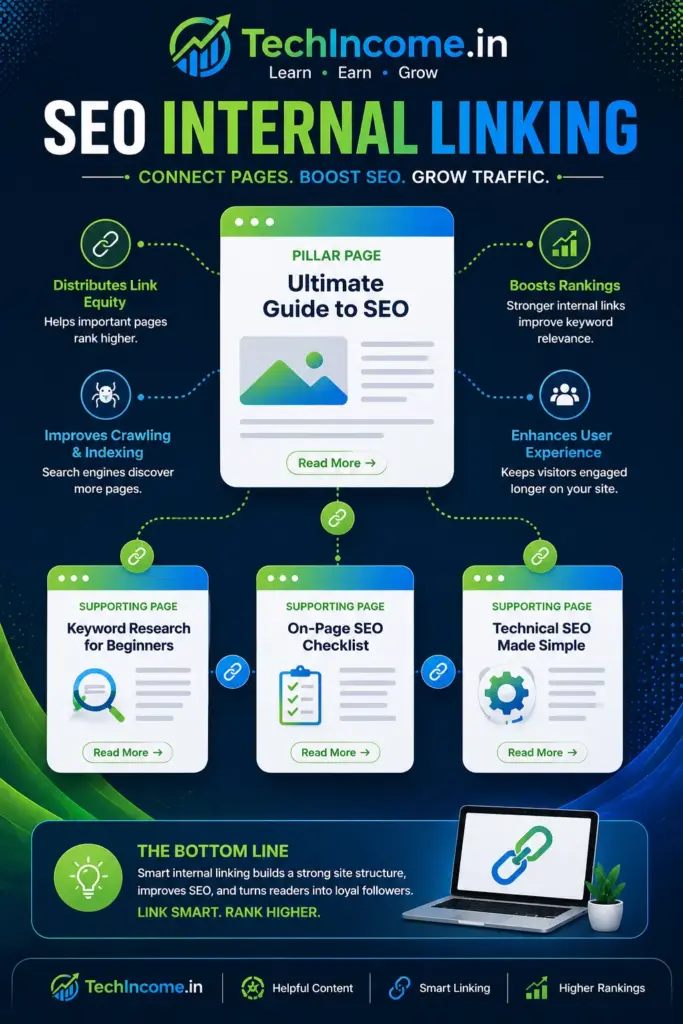
Rank Math can suggest internal links, but you should not rely on automation alone. Internal linking works best when it is intentional and context-based.
What You Should Do
1) Link to 2–5 Relevant Posts
Every blog post should connect to other content.
How to choose links:
- Related topics
- Supporting guides
- Pillar articles
Example:
If your post is about “starting a blog”:
Link to:
- Blogging niches
- Blogging income
- SEO writing guide
2) Use Descriptive Anchor Text
Anchor text tells both users and search engines what the linked page is about.
Weak:
- Click here
- Read more
Strong:
- how to start a blog in 2026
- best blogging niches for beginners
Rule:
- Keep it natural
- Use keywords where relevant
3) Place Links Contextually
Links should appear naturally inside content.
Good example:
To choose the right niche, read our guide on “best blogging niches in 2026.”
Avoid:
- Adding links randomly at the end
- Forcing links where they don’t fit
4) Link to Important Pages More Often
Not all pages are equal.
Prioritize linking to:
- Pillar content
- High-value posts
- Monetization-related articles
This strengthens their ranking potential.
Why Internal Linking Works
1) Improves SEO
- Helps search engines crawl your site
- Distributes authority across pages
2) Increases User Engagement
- Encourages users to explore more pages
- Improves time on site
3) Builds Topic Authority
- Shows depth in your niche
- Strengthens content clusters
What Rank Math Helps With
Rank Math can:
- Suggest internal links
- Highlight linking opportunities
But:
- You should decide relevance
- Do not blindly insert suggestions
Common Mistakes to Avoid
- No internal links
- Generic anchor text
- Linking unrelated content
- Overlinking (too many links)
Practical Rule
For every 1000-word post:
- Add 2–5 internal links
- Ensure each link adds value
Quick Checklist
Before publishing:
- Added 2–5 internal links
- Used descriptive anchor text
- Linked to relevant content
- Included at least one pillar link
Internal linking is one of the simplest ways to improve SEO and engagement—if done intentionally.
Step 7: Use Schema Markup
Schema helps search engines understand what your content is about.
For most blog posts, just stick with the default “Article” schema—that’s enough.
If you’re writing a step-by-step guide, you can use “HowTo” schema, but only when it actually fits the content.
Don’t overthink this part. Keep it simple in the beginning and focus more on writing useful content.
Step 8: Submit Sitemap to Google
Rank Math generates a sitemap automatically.
Submit it via:
- Google Search Console
This helps:
- Faster indexing
- Better crawlability
Step 9: Monitor Performance
Track:
- Indexed pages
- Keyword rankings
- Traffic growth
Adjust content based on performance.
What Rank Math Score Actually Means
Rank Math gives a score out of 100.
Important:
- 80+ score is good
- But score ≠ ranking guarantee
Google ranks based on:
- Content quality
- User engagement
- Authority
Common Mistakes to Avoid
1) Chasing 100/100 Score
This often leads to:
- Keyword stuffing
- Poor readability
2) Ignoring Content Quality
No plugin can fix weak content.
3) Using Too Many Keywords
Focus on one primary keyword.
4) Overusing Schema
Keep it simple unless needed.
Ideal Workflow
For every post:
- Write content first
- Add keyword
- Optimize title and meta
- Add internal links
- Check Rank Math suggestions
- Publish
What Rank Math Cannot Do
It cannot:
- Generate traffic automatically
- Replace keyword research
- Replace good writing
It is a tool, not a strategy.
Final Verdict
Rank Math is powerful when used correctly.
Its real value is:
- Guiding structure
- Improving consistency
- Supporting SEO fundamentals
Use Rank Math to optimize—not to control your writing.
Recommended Next Reads:
- https://techincome.in/on-page-seo-checklist-beginners-2026/
- https://techincome.in/write-seo-blog-posts-that-rank-2026/
- https://techincome.in/get-blog-traffic-without-backlinks-2026/
- https://techincome.in/best-wordpress-setup-beginners-2026/
FAQs: How to Use Rank Math for SEO
1. Is Rank Math better than other SEO plugins for beginners?
It is beginner-friendly and offers many features in the free version, which makes it a strong option for new bloggers.
2. Do I need to buy the paid version of Rank Math to rank my posts?
No. The free version is sufficient for most beginners. Paid features are useful only when you scale.
3. Can Rank Math automatically improve my rankings?
No. Rank Math only helps with optimization. Rankings depend on content quality, SEO strategy, and competition.
4. How many keywords should I target in one post using Rank Math?
Focus on one primary keyword. You can naturally include related keywords, but avoid targeting multiple unrelated ones.
5. What is a good Rank Math SEO score to aim for?
A score above 70–80 is generally good. However, content quality matters more than the score.
6. Should I follow every suggestion given by Rank Math?
No. Use suggestions as guidance. Ignore anything that makes your content unnatural or harder to read.
7. Can I change my focus keyword after publishing a post?
Yes, but changing it frequently is not recommended. It is better to optimize correctly before publishing.
8. Does Rank Math help with indexing my posts?
Indirectly. It generates sitemaps and helps structure content, which supports faster indexing when connected to Google Search Console.
9. Do I need technical knowledge to use Rank Math?
No. Most features are beginner-friendly and can be used without coding knowledge.
10. How often should I update SEO settings in Rank Math?
You do not need frequent changes. Set it up correctly once and only update when needed or when your strategy evolves.