
You Can Write Well and Still Not Rank — Here’s Why
Most beginner bloggers focus almost entirely on the writing. The research, the structure, the word count — all solid. But then the post goes live, months pass, and it’s sitting somewhere on page 4 of Google where nobody will ever see it.
The missing piece is almost always on-page SEO. Not because it’s complicated — it isn’t. But because most beginners either skip it entirely or do it so inconsistently that the results never compound.
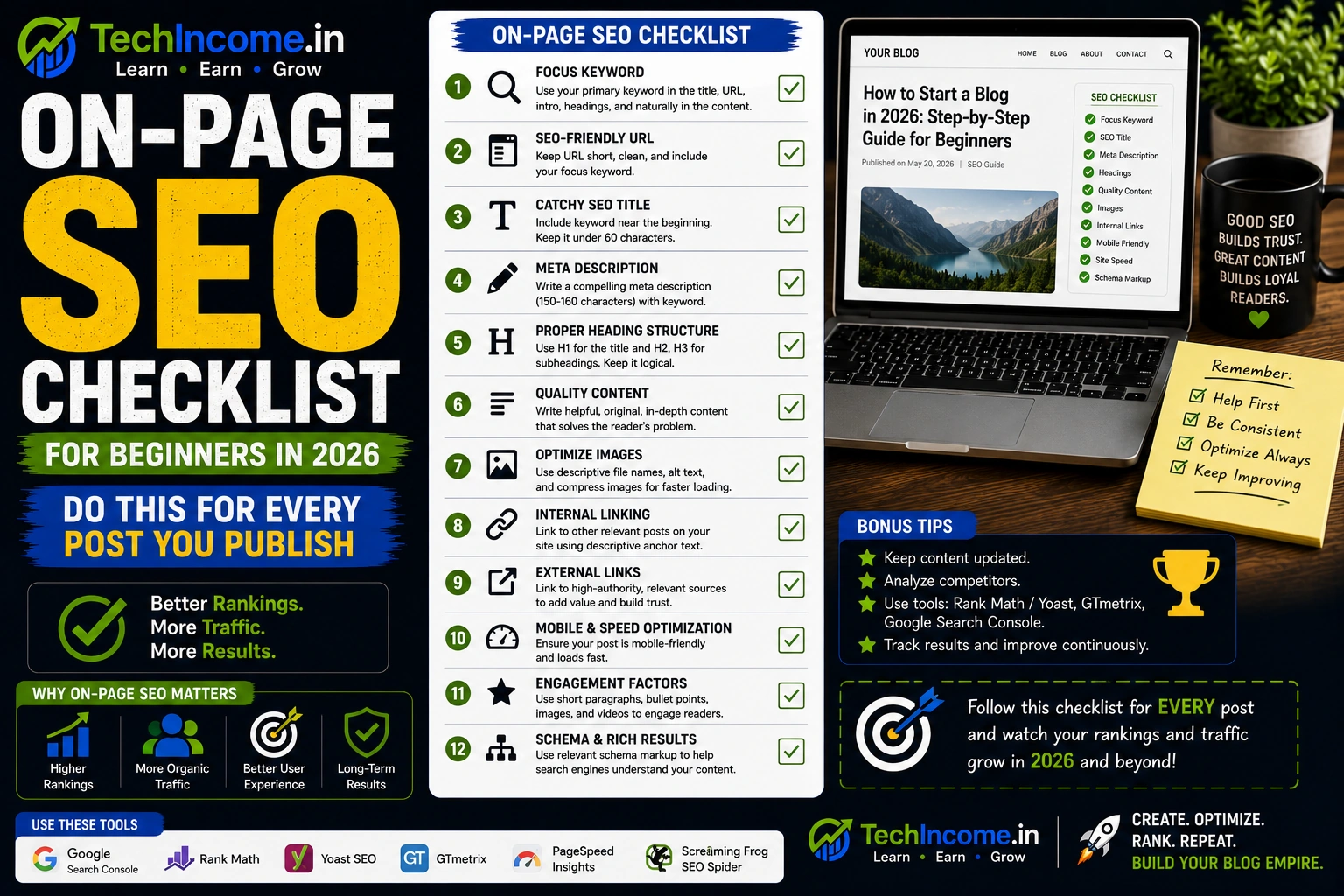
On-page SEO is what tells search engines what your post is about, who it’s for, and why it deserves to rank. Done correctly on every post, it becomes one of the most reliable levers you have for growing organic traffic. This checklist gives you exactly what to do, in the order that makes sense.
1. Choose One Primary Keyword and Commit to It
Every post you write needs one primary keyword — the specific phrase you want that post to rank for. Not three keywords. Not a broad topic. One phrase that reflects exactly what someone would type into Google to find that post.
If you’re writing about setting up WordPress for the first time, your primary keyword might be “wordpress setup for beginners” rather than just “wordpress.” The more specific it is, the better your chances of ranking for it.
Once you’ve chosen it, your keyword needs to appear in three non-negotiable places:
- The title of the post
- The first paragraph (ideally within the first 100 words)
- At least one H2 heading
Beyond those three, let it appear naturally where it fits. Don’t force it into every other sentence. Google’s algorithm is good enough to understand context — keyword stuffing actively hurts your rankings now, it doesn’t help them.
2. Write a Title That Gets Clicked, Not Just Indexed
Your title does two jobs: it tells Google what your post is about, and it convinces a real person in the search results to click on yours instead of the five others listed alongside it.
Most beginner titles fail at the second job. They’re accurate but not compelling.
Weak: Blogging Guide
Strong: How to Start a Blog in 2026 (Step-by-Step Guide for Complete Beginners)
The second version includes the keyword, specifies a timeframe (2026 signals it’s current), and adds the parenthetical to signal it’s structured and beginner-friendly. Every one of those details increases click-through rate.
A few rules to follow:
- Keep it under 60 characters so it doesn’t get cut off in search results
- Include your primary keyword as close to the beginning as possible
- Add a clear outcome or benefit — what does the reader get from clicking?
3. Write Your Meta Description Manually — Every Time
The meta description is the 150 to 160 character summary that appears under your title in Google search results. It doesn’t directly affect your ranking, but it significantly affects whether someone clicks on your result — which does affect your ranking over time.
Don’t let your SEO plugin auto-generate this. The auto-generated version usually pulls the first two sentences of your post, which may or may not be compelling.
Write it yourself. Include your keyword naturally, summarize what the post delivers, and give the reader a reason to click. Think of it as a two-sentence pitch for your article.
Example: A complete on-page SEO checklist for beginner bloggers — covering keyword placement, meta tags, internal links, and everything else to do before you hit publish.
That’s specific, includes the keyword, and tells the reader exactly what they’re getting.
4. Clean Up Your URL Slug
Your URL slug is what appears after your domain name. It should be short, include your keyword, and remove every word that isn’t adding meaning.
Good: /on-page-seo-checklist-beginners
Avoid: /on-page-seo-checklist-for-complete-beginners-in-2026-a-full-guide
The second version is harder to read, harder to share, and doesn’t add any ranking value from the extra words. Keep it to 3 to 5 words that capture the core topic. Remove articles (a, an, the), prepositions (in, for, of), and any filler that makes the URL longer without making it clearer.
Set this before you publish. Changing a URL after a post is indexed requires a redirect — possible, but an unnecessary complication.
5. Structure Your Headings Correctly
Heading structure is both a readability tool and an SEO signal. Used correctly, it tells Google how your content is organized and helps readers navigate the post.
The rules are straightforward:
- H1 — this is your post title. There should be exactly one H1 per post, and your CMS handles this automatically when you set the title.
- H2 — use these for your main sections. Each H2 should represent a distinct part of your topic.
- H3 — use these for sub-points within an H2 section.
Include your primary keyword or a close variation in one or two H2 headings where it fits naturally. Don’t force it into every heading — that reads awkwardly and doesn’t add ranking value.
The practical test: if someone read only your headings, would they understand the structure and purpose of your post? If yes, your heading hierarchy is working.
6. Make Sure the Content Actually Earns Its Ranking
No amount of on-page optimization will rank thin, incomplete content in 2026. Google’s quality signals have gotten sophisticated enough to filter it out. The content itself has to genuinely answer the query better than what’s currently ranking.
What that usually means in practice:
- At least 1,000 to 2,000 words for most informational queries (though the right length is whatever fully answers the question — not more, not less)
- Step-by-step guidance, not just general advice
- Real examples that make abstract points concrete
- Answers to the follow-up questions a reader would naturally have
Before you publish, ask honestly: if someone searched for this topic and landed on this post, would they leave with everything they needed? If there are gaps, fill them.
7. Optimize for Readability
Readability is an on-page SEO factor because it directly affects engagement. If your post is hard to read, people leave quickly — and a high bounce rate signals to Google that your content isn’t satisfying the search.
The basics:
- Keep paragraphs to 2 to 4 lines maximum
- Use simple, direct language — if a simpler word exists, use it
- Break up dense sections with bullet points or numbered lists where it makes sense
- Use enough white space so the page doesn’t look intimidating
This matters even more on mobile, where long paragraphs fill the entire screen and feel like a wall. Most of your readers are on their phones. Write and format accordingly.
8. Add Internal Links to Related Posts
Internal linking is one of the easiest, highest-value SEO actions you can take — and one of the most consistently skipped by beginners.
When you link to a related post within your site, you do three things simultaneously: you keep the reader on your site longer (good for engagement metrics), you help Google understand how your content is connected (good for topical authority), and you pass some ranking strength from established posts to newer ones.
For every post, aim for 2 to 5 internal links to genuinely related content. Use descriptive anchor text — the clickable words should tell the reader where the link is going, not just say “click here.”
Good anchor text: “This guide on keyword research with Ahrefs covers how to find these low-competition topics”
Weak anchor text: “Click here for more”
Also make a habit of going back to older posts and adding internal links to your new ones. Don’t leave new posts isolated — connect them to the existing structure.
9. Optimize Every Image You Upload
Images improve engagement but can hurt your site speed if you’re not careful. Both of those things affect your rankings.
Three things to handle for every image:
Compress before uploading. Use a free tool like Squoosh or TinyPNG. Never upload a full-resolution photo directly from your camera or phone — a 4MB image on a blog post is a performance disaster. Get it under 100KB if possible.
Write alt text. Alt text is the description that appears if the image fails to load, and it’s what screen readers use for accessibility. It also gives you a natural place to include your keyword where relevant. Keep it descriptive and accurate — don’t just stuff the keyword in.
Use a relevant image. Generic stock photos of people smiling at laptops add nothing. If an image doesn’t illustrate a specific point in your post, it doesn’t need to be there.
10. Check Your Page Speed
Page speed is a confirmed Google ranking factor, and slow-loading sites have measurably higher bounce rates — people don’t wait. If your site takes more than 3 seconds to load on mobile, you’re losing a significant portion of visitors before they see any of your content.
For most beginner bloggers, the three most impactful speed improvements are:
- Using a lightweight theme (Kadence is a strong option — it’s built for speed)
- Installing and configuring a caching plugin
- Compressing images before upload (covered above)
You can test your speed using Google’s PageSpeed Insights — it’s free and gives you specific recommendations. You don’t need a perfect score, but you need to be in a reasonable range.
11. Confirm It Works on Mobile
Your Kadence theme is responsive by default, but responsive doesn’t automatically mean good. Test every post on an actual phone after publishing.
Look for: text that requires zooming, buttons or links that are hard to tap, images that overflow the screen, and paragraphs that look even longer on mobile than they did on desktop.
Google uses mobile-first indexing — it evaluates your mobile experience to determine your rankings, not your desktop version. A post that looks great on a 27-inch monitor but is difficult to navigate on a phone is being evaluated on the phone experience.
12. Add Schema Markup
Schema markup is structured data that helps search engines understand your content more precisely. It can also make your results more visually distinctive in search — FAQ schema, for example, can display your questions and answers directly in the search results, which increases click-through rate significantly.
The good news is you don’t need to code this manually. Rank Math handles schema automatically for blog posts (Article schema by default), and lets you add FAQ schema with a simple toggle. Enable FAQ schema on any post that has a Q&A section — it’s a quick win that takes under a minute to set up.
13. Link Out to Authoritative Sources When Relevant
External linking — linking to credible outside sources — is optional but genuinely useful when done right. Linking to a relevant study, official documentation, or a well-known publication adds credibility to your claims and signals to Google that your content is well-researched.
Don’t overdo it. Two or three external links per post to genuinely useful sources is more than enough. Set them to open in a new tab so readers don’t leave your site entirely.
Avoid linking to direct competitors. Link to sources that supplement your content, not ones that replace it.
14. Keep Your Content Fresh
Published content isn’t static — it ages. Statistics become outdated, tools change their interfaces, recommendations shift. A post that was accurate in 2023 might be misleading by 2026.
Google rewards freshness, especially for topics that change over time. Every few months, go through your top-performing posts and check:
- Are the statistics still current?
- Are the tool recommendations still accurate?
- Is there anything new worth adding?
Updating and republishing a post — and updating the publish date — can give it a meaningful rankings boost with relatively little effort compared to creating something new from scratch.
15. Match Search Intent Before You Publish
This is the final check — and arguably the most important one on the entire list. Before you publish, search your target keyword on Google and look at the top 5 results.
Ask yourself: does my post match what these results are doing? If the top results are all step-by-step how-to guides and your post is a broad opinion piece, the format is wrong regardless of how good the content is. If the top results are comparison articles and yours is a definition-focused explainer, same problem.
Search intent — the reason behind a search — should shape the format, depth, and angle of your content. On-page SEO can’t compensate for an intent mismatch. Get this right before optimizing anything else.
Your Complete Pre-Publish Checklist
Run through this before every post goes live:
- Primary keyword appears in title, first paragraph, and at least one H2
- Title is specific, includes a benefit or outcome, and is under 60 characters
- Meta description is written manually and includes the keyword
- URL slug is short, clean, and keyword-focused
- Heading structure uses one H1, H2s for main sections, H3s for sub-points
- Content fully answers the query with examples and depth
- Paragraphs are 2 to 4 lines — no long text blocks
- 2 to 5 internal links with descriptive anchor text
- All images are compressed and have alt text
- Post is tested on mobile
- FAQ schema added if the post has a Q&A section
- Search intent confirmed — format matches what’s ranking
If everything on this list is checked, publish with confidence.
The Right Workflow: Research, Write, Then Optimize
One common mistake is trying to optimize while writing — checking your Rank Math score mid-draft, adjusting keyword placement in real time, second-guessing every sentence. This kills your writing flow and often produces worse content.
The workflow that works better:
- Keyword research first — know your target before you write a word
- Write the full draft without interruption
- Open Rank Math and go through the checklist
- Add internal links and finalize images
- Check readability and mobile view
- Publish
Each step has its own focus. Mixing them slows everything down and produces content that’s been over-optimized in some areas and under-optimized in others.
Recommended Next Reads:
- https://techincome.in/write-seo-blog-posts-that-rank-2026/
- https://techincome.in/how-to-use-rank-math-for-seo/
- https://techincome.in/keyword-research-ahrefs-beginner-guide/
- https://techincome.in/blog-post-structure-increase-time-on-page-2026/
FAQs
-
How many keywords should I target in a single blog post?
One primary keyword, and a handful of natural variations that appear organically throughout the content. Trying to rank a single post for multiple unrelated keywords fragments your focus and confuses search engines about the post’s core topic. Use Rank Math’s focus keyword field for your primary keyword and let the rest appear naturally.
-
Does Rank Math’s score need to be 100 before I publish?
No. Rank Math’s score is a guide, not a requirement. A score of 70 to 85 on a well-written, well-structured post is perfectly fine. Chasing 100 often leads to awkward keyword placement or unnecessary changes that hurt readability. Readable content that genuinely helps the reader will outperform a technically perfect but robotic post.
-
How important is the meta description for rankings?
Directly, not at all — Google has confirmed it’s not a ranking factor. Indirectly, it’s very important, because a well-written meta description improves click-through rate, and higher click-through rates do influence rankings over time. Write it for the human reading the search results, not for the algorithm.
-
Should I include the year (2026) in my title and URL?
In the title, yes — it signals the content is current and increases click-through rate for time-sensitive topics. In the URL, no — including the year in a slug means you’ll need to change the URL (and set up a redirect) when you update the post in future years. Keep the slug timeless and update the title as needed.
-
How often should I update old blog posts?
Review your top 20 posts every 3 to 6 months. Prioritize posts that are ranking on pages 2 or 3 — a content update combined with fresher information often pushes these onto page 1. Posts that aren’t ranking at all usually have a keyword targeting or search intent issue, which updating alone won’t fix.
-
Is it worth adding FAQ sections to every blog post?
Not every post needs one, but FAQ sections earn their place on how-to posts, comparison articles, and informational guides. They answer the follow-up questions readers naturally have, which improves content completeness — and FAQ schema can display your Q&As directly in Google search results, which increases click-through rate noticeably.
-
What’s the single most impactful on-page SEO change a beginner can make?
Consistently matching search intent. You can optimize every other element perfectly, but if your content format doesn’t match what the searcher actually wants — a guide when they want a comparison, or a definition when they want steps — it won’t rank. Check the top 5 results for your keyword before you write anything, and make sure your post fits the format pattern.