
AdSense Approval Isn’t Complicated — It’s Just Systematic
Every week, bloggers apply for Google AdSense with sites that were never going to be approved. Not because their blogs are bad, but because they skipped the fundamentals that Google explicitly looks for — or they applied too early before those fundamentals were in place.
The good news is that AdSense approval is entirely predictable once you understand what the review process is actually evaluating. Google isn’t looking for viral traffic or a famous domain name. They’re looking for a legitimate, trustworthy site with real content that follows their policies. Build that, and approval is a formality, not a gamble.
This guide walks you through exactly what needs to be in place before you apply — and what to fix if you’ve already been rejected.
What Google AdSense Actually Evaluates
Before getting into the checklist, it helps to understand the frame Google is applying when reviewing your site. Their reviewers — human or algorithmic — are asking a simple question: is this a legitimate website that provides real value to visitors, and is it a safe environment for advertisers to show ads?
That question has several components:
Is the content original and useful, or thin and generic? Does the site have a clear focus, or is it a random mix of unrelated topics? Does it look like a real website that a real person built with genuine intent, or does it look like it was assembled to game the system? Does it follow Google’s content policies, or does it contain anything that would make advertisers uncomfortable placing ads next to it?
Everything in this guide is oriented around answering those questions correctly — not toward tricking the system, but toward actually building the kind of site that deserves approval.
Step 1: Define a Clear Niche Before You Apply
A blog about five different unrelated topics sends a confusing signal to Google’s review process. It’s not clear what the site is about, who it’s for, or whether it has any meaningful expertise in any particular area.
A blog focused on one specific topic — freelancing for beginners in India, personal finance for salaried employees, blogging and SEO for new bloggers — communicates exactly what it is and what it offers. That clarity builds the perception of legitimacy and topical credibility that AdSense reviewers are looking for.
If your blog currently covers multiple unrelated topics, consider whether the posts can be connected under a broader theme. If they genuinely can’t, focus your next 20 posts entirely on one area and build the topical depth there before applying.
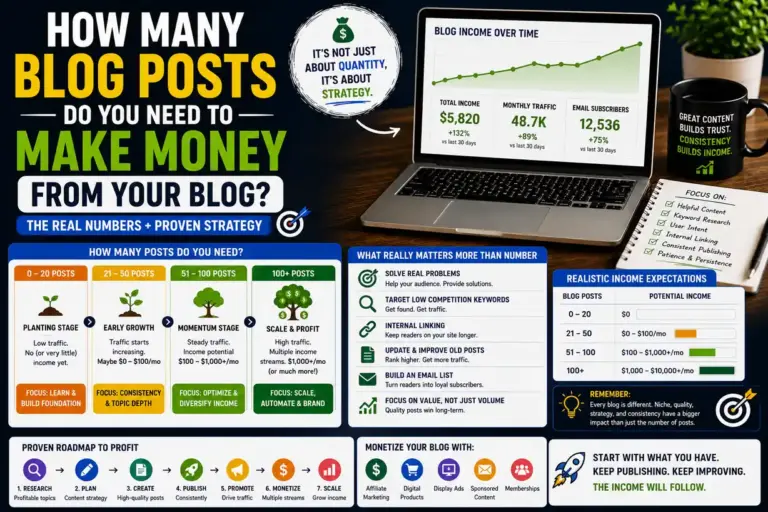
Step 2: Publish 20 to 30 High-Quality Posts — Not Just Any Posts
AdSense doesn’t publish a specific minimum post count for approval. But in practice, sites with fewer than 15 to 20 quality posts almost always get rejected for “insufficient content” — one of the most common rejection reasons.
The operative word is quality. Twenty posts that are 400-word overviews of obvious information won’t get you approved any faster than 10 posts. What Google is evaluating is whether your content provides genuine value to readers.
What qualifies as high-quality for AdSense purposes:
Length and depth. Posts of 1,000 to 2,000+ words that fully cover their topic are significantly more likely to satisfy the “value for users” bar than shorter, thinner content. This doesn’t mean padding — it means actual completeness.
Original writing. Content that’s been copied from other sites, spun from existing articles, or generated by AI without meaningful editing will get rejected. Google’s systems are increasingly good at detecting this, and their reviewers are trained to spot it.
Practical value. Content that helps readers accomplish something, solve a problem, or make a better decision is what Google considers high-value. Content that just restates facts without adding any perspective or actionability is what they consider low-value.
Correct structure. Proper use of headings (H2, H3), short paragraphs, readable formatting — these signal a well-constructed site, not a hastily assembled one.
Get your content to this standard before you think about applying.
Step 3: Add the Four Required Pages — These Are Non-Negotiable
This is the step that causes the most preventable rejections. Google explicitly requires certain pages to exist on a site before they’ll approve it for AdSense, and many bloggers apply without them.
About page. This should clearly explain who you are and what your site is about. It doesn’t need to be a personal biography — a few paragraphs explaining your background, why you created the blog, and who it’s designed to help is enough. What matters is that it demonstrates a real person is behind the site.
Contact page. A way for readers and brands to reach you. A simple contact form using a free plugin like WPForms, or even just a clearly displayed email address, satisfies this requirement. AdSense reviewers look for this as a signal that the site is accessible and legitimate.
Privacy Policy. This is legally required in most jurisdictions and explicitly required by AdSense. Your privacy policy needs to explain what data you collect from visitors and how you use it. There are free privacy policy generators online — use one and customize it for your site. Don’t copy someone else’s privacy policy verbatim.
Disclaimer. Particularly important if you plan to run affiliate links alongside AdSense, or if your content covers topics like finance, health, or legal matters. A disclaimer clarifies your relationship with products you mention and limits liability for information readers act on.
Create these pages before you apply. No exceptions.
Step 4: Use a Clean, Professional Website Design
AdSense reviewers evaluate whether your site looks like a legitimate, trustworthy property — and design is part of that assessment. A cluttered, hard-to-navigate, or visually chaotic site raises questions about legitimacy even if the content is good.
What “clean” actually means in practice:
Simple navigation. A clear menu with logical structure — Home, Blog, About, Contact — that makes it easy to find what you’re looking for. Don’t have 15 menu items pointing to random pages.
Readable layout. Sufficient white space, readable font size (at least 16px for body text), adequate contrast between text and background. If a visitor has to strain to read your content, that’s a problem.
Mobile responsiveness. The majority of web traffic is mobile. Google knows this. A site that looks broken on a phone is not going to impress AdSense reviewers. Test your site on your phone before applying.
No pre-existing ads. If you have banner ads, pop-ups, or other advertising already running on your site from other networks, remove them before applying. A site plastered with ads before it’s been approved by AdSense looks like a site built purely to serve ads, not a site built to serve readers.
Kadence (free version) handles all of this cleanly out of the box. If you’re using a heavy multipurpose theme that’s slow to load and visually cluttered, switching to a lightweight theme before applying is worth the effort.
Step 5: Set Up Basic SEO and Confirm Your Content Is Indexed
Google can’t approve your site for AdSense if their crawlers haven’t been able to properly index your content. Before applying, verify that your posts are actually appearing in Google search results.
Open Google Search Console (which you should have set up when you launched your blog — if you haven’t, do it now), go to the URL Inspection tool, and check a few of your posts. Confirm they’re indexed. If they’re not, submit them manually through Search Console and wait for indexing before applying.
Also confirm your Rank Math sitemap is submitted to Search Console. Your sitemap tells Google what pages exist on your site — without it, indexing is slower and less complete.
Basic on-page SEO across your posts — proper headings, clean URLs, meta descriptions — also contributes to how professional and legitimate your site appears. A site where every URL is structured as yoursite.com/?p=4382 rather than yoursite.com/topic-keyword looks unfinished compared to one with clean permalink structure.
Step 6: Follow Google’s Content Policies — Know What to Avoid
This is the rejection category that surprises bloggers who didn’t know they were violating anything. Google’s AdSense content policies are specific about what types of content disqualify a site.
Definitely disqualifying:
- Adult content or anything sexually suggestive
- Content promoting violence, hate speech, or illegal activities
- Copyrighted content published without permission
- Misleading health or medical claims
- Content designed to deceive readers about what it is
Less obvious but also problematic:
- Posts that are essentially just embedded videos with minimal original text
- Pages that exist primarily to rank for keywords but provide no real reading value
- Excessive low-quality pages that drag down the average quality of the site
Before applying, do a quick audit of your content. If any posts feel thin, generic, or borderline on policy compliance, either improve them substantially or make them private before applying. Reviewers evaluate the overall quality of your site — a handful of weak posts can affect the evaluation of the stronger ones.
Step 7: Evaluate Your Site’s User Experience Honestly
Google’s review process isn’t just about whether your content meets a quality bar. It’s also about whether your site functions well as a place for visitors to spend time. A site with great content but poor user experience is still a problematic environment for advertisers.
Go through your site as if you’re a first-time visitor:
- Does the homepage immediately communicate what the blog is about?
- Can you navigate to your most important content within two clicks?
- Does the site load reasonably quickly? (Test with Google PageSpeed Insights — aim for a score above 60 on mobile)
- Do all your links work? Any 404 errors or broken internal links?
- Is the reading experience comfortable on a phone screen?
Fix what you find before applying. These aren’t difficult problems — they’re the kind of thing you spot immediately when you look at your site with fresh eyes.
Step 8: Remove or Fix Low-Quality Pages Before Applying
Most blogs accumulate some weak pages over time — a post written early that’s too short, a category page with only one article in it, a tag page with auto-generated content, the default “Sample Page” that came with WordPress and never got deleted.
Before you apply, do a content audit:
- Delete any pages that have fewer than 300 words and no real substance
- Remove the default WordPress sample page if it’s still there
- Noindex tag pages and archive pages that have no unique content (Rank Math handles this)
- Check that every page you want reviewers to see meets your quality standard
Quality over quantity applies to AdSense review as much as it does to SEO. A site with 20 excellent posts will outperform a site with 40 posts where half of them are thin and forgettable.
Step 9: Apply at the Right Time — Don’t Rush This
The most common avoidable mistake is applying too early. A site with 8 posts, no legal pages, and content that was written in the first week of the blog’s life is not going to be approved — and a rejection goes on your account history.
Apply when all of the following are true:
- You have 20 to 30 well-written, properly structured posts
- All four essential pages (About, Contact, Privacy Policy, Disclaimer) are live and complete
- Your content is indexed in Google Search Console
- Your site is mobile-friendly and loads at a reasonable speed
- There are no content policy violations anywhere on the site
- Your design is clean and navigation is straightforward
If you can check every item on that list, apply. If you can’t, identify what’s missing and fix it first. The review typically takes 1 to 2 weeks — sometimes faster, sometimes longer depending on review volume. During that time, keep publishing. A site that adds new content during the review period signals activity and legitimacy.
What to Do If Your Application Gets Rejected
AdSense rejection emails specify a reason — read it carefully, because it usually tells you exactly what to fix. The most common rejection reasons and what they mean:
“Insufficient content” — you need more posts, longer posts, or better posts. Usually means fewer than 20 posts or posts that are too thin. Publish 10 more quality posts and reapply.
“Site does not comply with AdSense program policies” — something on your site violates their content policies. Review every page carefully, identify what triggered it (could be a specific post, an embedded video, a copyright image), fix or remove the issue, and reapply.
“Site under construction” — your site looks incomplete. Make sure all essential pages are live, navigation is functioning, and there are no placeholder pages or “coming soon” notices anywhere.
“Valuable inventory: no content” — Google couldn’t crawl your content properly, or found pages that have no substantive content. Check that your posts are indexed and remove any empty or near-empty pages.
Wait at least 2 to 3 weeks after fixing the identified issues before reapplying. Applying immediately after rejection without making real changes wastes time and creates a pattern that makes subsequent reviews more scrutinized.
What Doesn’t Actually Matter for AdSense Approval
Several things that bloggers spend time worrying about have minimal impact on AdSense approval:
Traffic volume. Google does not require a minimum traffic threshold for AdSense approval. A blog with 50 daily visitors that meets all quality criteria will be approved. A blog with 5,000 daily visitors that violates content policies won’t be.
Domain age. A newer domain isn’t disadvantaged relative to an older one — content quality is what matters. Some bloggers wait six months thinking a newer domain hurts their chances; it doesn’t in any meaningful way.
Backlinks. How many external links point to your site has no bearing on AdSense approval. AdSense is evaluating your content and site quality, not your SEO metrics.
Specific post count. There’s no magic number — the “20 to 30 posts” recommendation is a guideline based on what typically produces enough quality content to pass review, not a fixed threshold in AdSense’s algorithm.
Focus on what actually matters: content quality, site completeness, policy compliance, and user experience. Get those right and the factors you can’t control will take care of themselves.
The Pre-Application Checklist
Run through this before you submit your application:
- At least 20 to 25 original, well-written posts of 1,000+ words published
- Posts are clearly focused on one niche or related topic area
- About page explains who you are and what the blog covers
- Contact page with a working contact method
- Privacy Policy page (not copied from another site)
- Disclaimer page (especially if you have any affiliate links)
- Site loads reasonably fast on mobile
- Navigation menu is clean and functional
- No broken links or 404 errors
- Content is indexed in Google Search Console
- No content policy violations anywhere on the site
- No other ad networks or pop-up ads currently running
If every item is checked, submit your application. Then keep publishing while you wait — the review period is production time, not waiting time.
Recommended Next Reads:
- Affiliate marketing for bloggers – The Beginner Guide for 2026
- How much can you Earn from Blogging in India
- Get Blog Traffic without Backlinks in 2026
FAQs
-
How many blog posts do I need for AdSense approval?
There’s no officially stated minimum, but in practice, 20 to 25 quality posts of 1,000+ words each is the threshold where approvals become consistent. Fewer posts are possible if the quality is excellent, but most rejections for “insufficient content” happen when blogs have fewer than 15 posts or posts that are too thin to demonstrate real value.
-
Does my blog need traffic to get AdSense approval?
No. Google does not require a minimum traffic threshold for AdSense approval. The review evaluates content quality and policy compliance — not how many people are visiting your site. A blog with minimal traffic but excellent content and a complete site setup will be approved. A high-traffic blog that violates content policies won’t.
-
How long does AdSense approval take in 2026?
Typically 1 to 2 weeks, though it can take longer during high-volume periods. Once you submit your application and add the AdSense code to your site, the review begins. You’ll receive an email with the outcome. If you don’t hear anything after 3 weeks, it’s worth checking your AdSense account dashboard for any status updates.
-
Can I apply for AdSense on a free Blogger or WordPress.com blog?
Blogger (by Google) does allow AdSense applications, but approval on a blogspot subdomain is less consistent than on a custom domain. WordPress.com’s free plan does not allow third-party ad networks including AdSense. For the most reliable path to approval, use a self-hosted WordPress site with a custom domain.
-
What’s the most common reason AdSense applications get rejected?
Insufficient or low-quality content is the most frequent reason — sites with too few posts, posts that are too short, or posts that are clearly AI-generated without meaningful editing. The second most common is missing essential pages (About, Privacy Policy, Contact, Disclaimer). Fix these two categories and you eliminate the majority of rejection risk.
-
Can I reapply after rejection, and how soon?
Yes, you can reapply. AdSense recommends waiting until you’ve actually fixed the issues identified in your rejection email — typically at least 2 to 3 weeks to make meaningful improvements. Reapplying immediately after rejection without changes just adds another rejection to your history. Use the rejection email as a specific to-do list.
-
Does blog design affect AdSense approval?
Indirectly, yes. A cluttered, slow, hard-to-navigate design signals a site that prioritizes appearance over user experience — or worse, a site assembled quickly to generate ad revenue rather than serve readers. A clean, mobile-friendly, fast-loading design signals legitimacy and care. You don’t need a premium design — you need a functional, professional-looking one. Kadence’s free theme is more than adequate.