Why Good Content Alone Isn’t Enough
You’ve done the keyword research, picked a solid topic, and written something genuinely useful. But your average time on page is 45 seconds and your bounce rate is through the roof.
The content isn’t the problem. The structure is.
Structure is what controls whether someone who lands on your post actually reads it — or clicks back and tries a different result. In 2026, where every search returns dozens of options and reader patience is shorter than ever, structure isn’t a formatting preference. It’s a performance variable.
This post breaks down the exact structure that keeps readers on the page, with examples of what each element looks like in practice.
Why Readers Leave in the First 10 Seconds
Before fixing the structure, it helps to understand what’s actually happening when someone bounces.
A reader lands on your post. In the first few seconds, they’re not reading — they’re scanning. They’re deciding whether this page is worth their time. They look at the first paragraph, skim a few headings, check how long the post is, and make a call.
If the first paragraph doesn’t immediately tell them this post is relevant to what they searched for, they leave. If the headings are vague or poorly organized, they leave. If the text looks like a wall with no visual breathing room, they leave.
None of those decisions have anything to do with how good your information is. They’re entirely structural. Which means they’re entirely fixable.
Element 1: The Hook — Your First 3 to 5 Lines
This is the most important part of your post. Not the conclusion, not the middle sections — the opening. If you lose someone here, nothing else gets read.
A strong hook does one or more of these things:
- Names a problem the reader recognizes immediately
- Challenges an assumption they’re walking in with
- Makes a specific, surprising claim that creates curiosity
Weak opening: Blog post structure is important for SEO and user engagement. In this post, we will cover the key elements of a good blog post.
Strong opening: Most readers decide to stay or leave within 10 seconds of landing on a blog post. The ones who leave aren’t disinterested — they just couldn’t see quickly enough that the post was worth their time.
The second version surfaces a tension. It tells the reader something real about their situation and implies the post is going to solve it. That’s what earns the scroll.
Element 2: Context — Tell Them What They’re About to Get
Right after the hook, give the reader a clear signal of what this post will deliver. Not a lengthy preamble — two or three sentences that confirm they’re in the right place.
Example: This guide covers the exact structure that keeps readers on the page longer, with examples of each element so you can apply it to your next post.
This does something underrated — it reduces the mental effort of reading. The reader doesn’t have to wonder where the post is going. They already know the destination, which makes them more willing to follow the journey.
It also reduces bounce rate on its own. A reader who knows what they’re getting is less likely to leave to search for something clearer.
Element 3: A Quick Summary Up Front
Add a short summary section near the top — a few bullet points covering the key points of the post. This might seem counterintuitive (why would you give away the answer before the explanation?), but it serves two important groups:
Skimmers — readers who want a quick overview before deciding to read fully. If your summary is useful, they’ll stay for the detail.
Mobile readers — who are more likely to scan on a small screen before committing to a full read.
A quick summary also signals confidence in your content. You’re not holding back the value to force someone through the whole post — you’re showing them upfront that there’s substance here.
Element 4: Logical Section Flow With Clear H2 Headings
Your H2 headings are the spine of your post. A reader who scans them should be able to understand the progression of the post without reading a single body paragraph.
Test your headings by reading them in sequence. Do they tell a coherent story? Does each one follow naturally from the previous? If your headings feel random or could appear in any order, the structure needs work.
A logical flow for a post on this topic might look like:
- Why readers leave quickly → establishes the problem
- What good structure achieves → reframes the solution
- Element by element breakdown → delivers the solution
- Common mistakes → addresses what to avoid
- Simple checklist → gives an action to take
Each heading answers one part of the question. Together they walk the reader from problem to solution in a clear line. That forward momentum is what keeps someone reading instead of wandering.
Element 5: Short Paragraphs — Non-Negotiable
This is the most mechanical fix on this list, and one of the highest-impact ones. Long paragraphs kill reading momentum.
Here’s why: when a reader reaches the end of a long paragraph, they have to make a micro-decision about whether to keep going. A long block of dense text looks like effort. Short paragraphs look manageable. Every visual break in the text is a small signal that says you’re making progress, keep going.
The rule is 2 to 4 lines per paragraph for a blog post. If you find yourself writing a sixth line in a paragraph, that’s a signal to look for a natural break point.
This is especially important on mobile, where a paragraph that takes 3 lines on desktop can fill an entire screen. If your post looks like an unbroken wall of text on a phone, you’re losing a significant portion of your readers before they finish the first section.
Element 6: Pattern Interrupts to Reset Attention
Even well-structured content can lose a reader’s attention in the middle sections — the part of the post where the initial curiosity has faded but the end isn’t visible yet. Pattern interrupts are small structural devices that reset attention.
They can be:
A direct question: So what actually separates a post that keeps readers from one that doesn’t?
A short, punchy statement after several longer paragraphs: Structure is what makes content readable. Period.
A before/after example: Shows contrast quickly and makes a point without requiring the reader to process a full paragraph.
A relevant bullet list: Breaks the visual rhythm of prose and gives the eye somewhere to land.
None of these are tricks. They’re tools for acknowledging that human attention naturally drifts, and designing the post to account for that.
Element 7: Real Examples in Every Major Section
Abstract advice without examples is the content equivalent of telling someone to “just be confident.” Technically true, practically useless.
Every major point in your post should have at least one example that makes it concrete. The example doesn’t have to be elaborate — it just has to show the principle in action.
Without example: Use specific language in your headings.
With example:
- Vague heading: Tips for Better Writing
- Specific heading: How to Write a First Line That Keeps Readers on the Page
The second version tells you exactly what you’re getting. The first could mean anything. That difference — between vague and specific — applies to every element of your post, not just headings.
The more examples you include, the more your content feels like it comes from someone who has actually applied this — not just someone who has read about it.
Element 8: Internal Links That Add Value
Internal linking keeps readers on your site longer and signals to Google how your content relates to other content you’ve published. But the way most bloggers do it — adding links almost as footnotes — misses the real opportunity.
An internal link works best when it’s presented as a natural next step for the reader. If someone is reading a post on blog post structure and you have a post on how to write engaging content, a line like “Structure and writing style work together — this post on writing content that doesn’t feel like AI output is worth reading alongside this one” is far more likely to get clicked than a generic anchor link dropped into a sentence.
Aim for 2 to 4 internal links per post, placed in sections where the linked post is genuinely relevant — not just wherever a keyword happens to match.
Element 9: Micro-Conclusions After Major Sections
After each main section, add one or two sentences that summarize the key takeaway before moving to the next. This does two things: it reinforces what the reader just learned (which improves retention), and it provides a natural transition that keeps the flow from feeling abrupt.
It doesn’t need to be elaborate. Something like: Short paragraphs aren’t a style choice — they’re the difference between a post that gets read and one that gets skimmed and abandoned. Then move to the next section.
These small closures prevent the reader from losing track of what they’ve covered as the post gets longer.
Element 10: A Final Summary That Closes the Loop
End your post with a section that pulls together the key points — not as repetition, but as consolidation. The reader has just absorbed a lot of information. A clear closing summary helps them leave with a sense of having learned something organized and complete, rather than a vague sense of having read something.
This also matters for skimmers who scroll to the bottom before committing to reading. A strong summary gives them enough to decide to go back and read the full post — or to at least feel satisfied enough to consider your site authoritative on the topic.
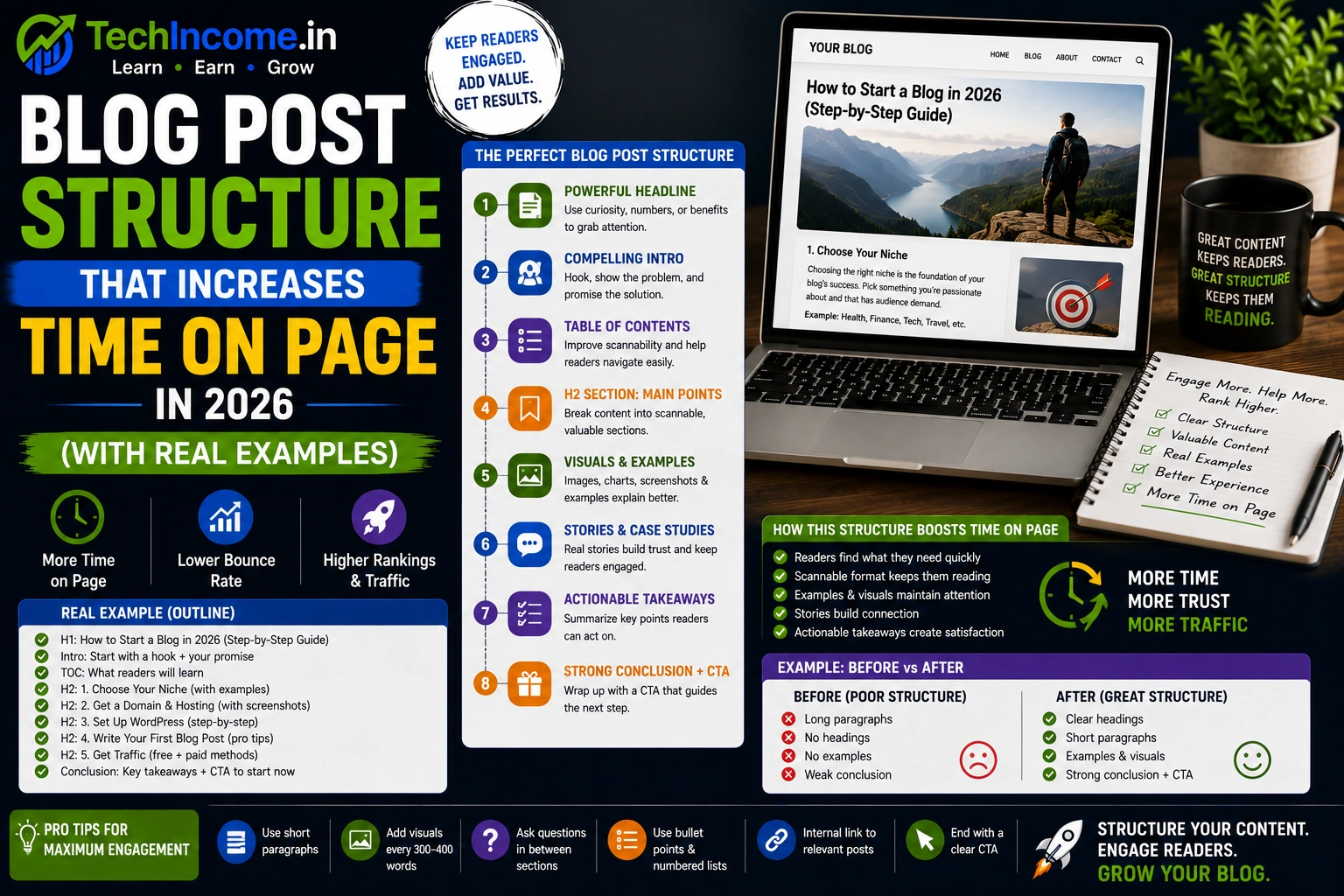
The Full Structure Template
Use this for every post you publish:
1. Hook — a specific, relevant opening that earns the reader’s attention in the first 5 lines
2. Context — 2 to 3 sentences on what the post delivers and why it matters
3. Quick summary — bullet points of the key takeaways up front
4. Main sections — each H2 covers one clear part of the solution, in logical order
5. Short paragraphs — 2 to 4 lines, no exceptions
6. Pattern interrupts — questions, contrasting statements, or visual breaks every few sections
7. Real examples — at least one per major point
8. Internal links — 2 to 4, placed where they’re genuinely useful
9. Section micro-conclusions — one or two sentences wrapping up each major section
10. Final summary — a clean close that consolidates what the reader learned
This isn’t a rigid formula — it’s a checklist. Some posts will need all ten elements. Others might combine a few. What matters is that every post is built with intention, not assembled randomly.
Common Mistakes That Drive Readers Away
Dense opening paragraphs. If your first paragraph is 8 lines long, most readers won’t make it to the second.
Headings that don’t tell you anything. “Introduction,” “Main Content,” “Tips” — these give the reader no reason to stop and read that section.
No examples. A post full of principles with nothing concrete feels theoretical and forgettable.
Poor flow between sections. If each section feels like a standalone piece with no connection to what came before or after, the post feels like a list rather than an argument.
Missing internal links. Every post you publish is an opportunity to bring readers deeper into your site. Not linking to related content wastes that opportunity.
Write for Scanners First, Deep Readers Second
Here’s a counterintuitive truth about blog readership: most people who read your post fully started by scanning it. They skimmed the headings and decided it looked worth their time, then went back to read properly.
That means your structure needs to work at two levels simultaneously — it needs to make sense when scanned (headings alone tell the story), and it needs to reward someone who reads every word (body paragraphs add depth and nuance).
If your headings are vague, you lose the scanners. If your body paragraphs are thin, you lose the deep readers. Strong structure serves both.
Pre-Publish Checklist
Before you hit publish on your next post, run through this:
- Does the first paragraph hook attention within 3 to 5 lines?
- Have you told the reader what they’ll get within the first screen?
- Do your H2 headings tell a logical story when read in sequence?
- Are your paragraphs 2 to 4 lines maximum?
- Does each major section end with a clear takeaway?
- Have you included real examples for the most important points?
- Are there 2 to 4 internal links in places where they’re genuinely relevant?
- Does the post end with a clear summary?
If you can answer yes to all of these, your structure is solid. The content quality will do the rest.
Recommended Next Reads:
- https://techincome.in/write-seo-blog-posts-that-rank-2026/
- https://techincome.in/on-page-seo-checklist-beginners-2026/
- https://techincome.in/get-blog-traffic-without-backlinks-2026/
FAQs
-
Does blog post structure actually affect Google rankings?
Yes, indirectly. Time on page, scroll depth, and bounce rate are engagement signals that influence how Google evaluates content quality. A well-structured post that keeps readers engaged longer will, over time, rank better than equally informative content with poor readability. Structure doesn’t replace SEO — it amplifies it.
-
How long should each section of a blog post be?
There’s no fixed length, but a good rule of thumb is 150 to 300 words per main section. Long enough to fully cover one point, short enough that the reader can finish it without losing momentum. If a section is running much longer, consider whether it should be split into two sections with separate headings.
-
Should I use a table of contents in my blog posts?
For long posts (1,500+ words), yes — a table of contents near the top helps readers navigate, especially on mobile. It also creates anchor links, which can appear in Google search results as sitelinks, improving click-through rate. For shorter posts, it’s optional.
-
How many H2 headings should a blog post have?
Roughly one H2 for every 200 to 300 words of content is a reasonable ratio. For a 1,500-word post, that’s around 5 to 8 main sections. More important than the number is that each heading represents a distinct, clearly defined point — not a variation of the same point in different words.
-
Is bullet point usage good or bad for SEO?
Used appropriately, bullet points improve readability and can appear as featured snippets in search results — which is a significant traffic advantage. The mistake is overusing them to the point where the post feels like a slide deck rather than coherent writing. Use bullets for lists of 3 or more parallel items; use prose for explanations and nuance.
-
How do I know if my post structure is working?
Check your average time on page in Google Analytics or Search Console. For a well-structured 1,500-word post, average time on page should be at least 3 to 4 minutes for a engaged audience. Scroll depth (available through tools like Hotjar or Microsoft Clarity) shows you exactly where readers are dropping off — which tells you which sections need the most structural improvement.
-
Does the same structure work for all types of blog posts?
The core elements — hook, context, logical sections, examples, summary — apply to most blog post types. The proportions shift depending on format: a listicle front-loads the list, a how-to guide emphasizes numbered steps, a comparison post needs a clear evaluation framework. Adapt the template to the format, but keep the underlying principles consistent.